



04 Sep 2026
Cable Management for Gamers: How to Keep Your Gaming Setup Clean
Cable Management for Gamers: Discover simple ways to organize gaming desk cables, hide wires, manage extension boards, and keep your setup clean with the JBM Mart Cable Management Tray.
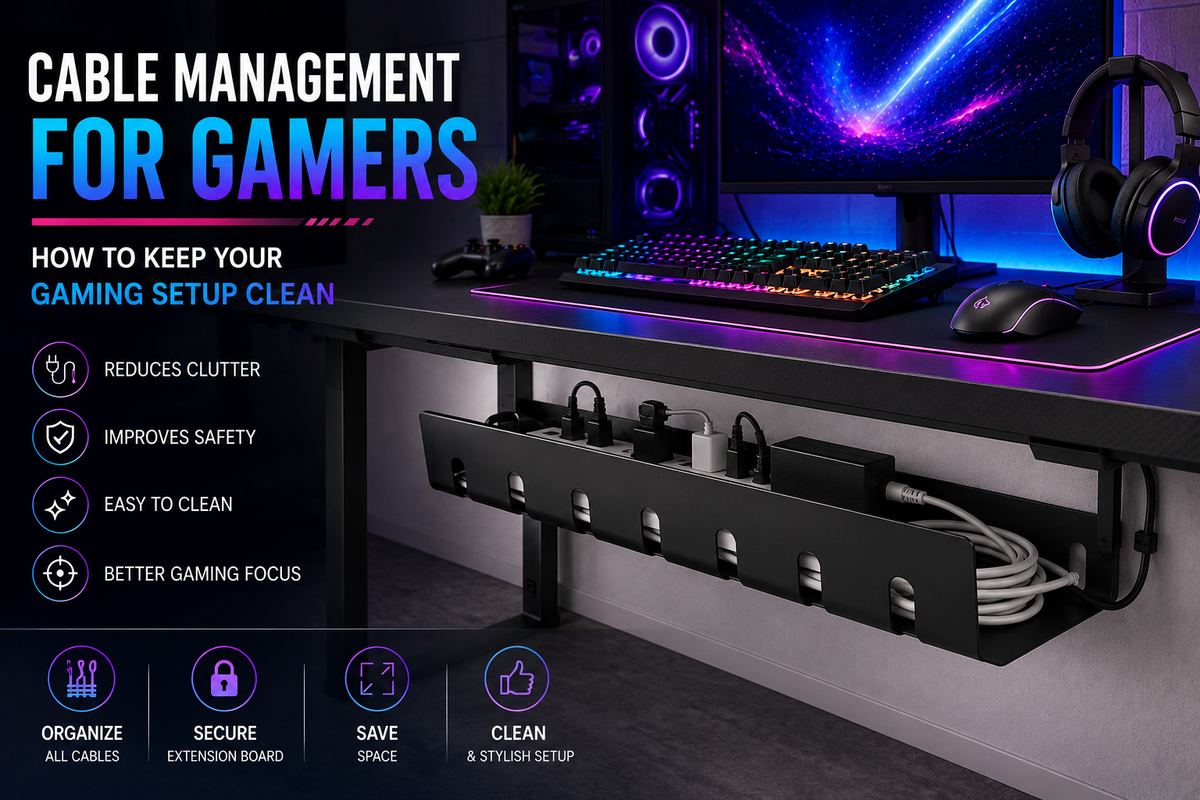
A gaming setup is more than just a computer, monitor, keyboard, and mouse. For many gamers, it is a dedicated space for entertainment, work, streaming, and long gaming sessions. But there is one common problem that can make even the best gaming desk look messy: cables.
From monitor cables and keyboard wires to power cords, USB cables, speakers, controllers, and chargers, a gaming desk can quickly become covered in tangled wires. Besides making your setup look untidy, poor cable management can make cleaning difficult and may cause cables to get pulled, tangled, or damaged.
The good news is that you don't need to completely redesign your gaming room to solve the problem. With a few simple cable management ideas for gaming setups, you can keep your desk clean, organized, and comfortable.
Why Is Cable Management Important for a Gaming Setup?
Good cable management is not only about making your gaming setup look attractive. It also makes the entire space easier to use.
A cluttered desk can make it difficult to find the right cable when you need it. Wires can get caught around your chair, interfere with your keyboard or mouse, and make cleaning your desk harder. A well-organized setup provides several benefits:
-
Keeps your gaming desk looking clean
-
Reduces cable tangling
-
Makes cleaning easier
-
Keeps important cables easy to identify
-
Prevents unnecessary pulling and bending
-
Creates more usable desk space
-
Gives your gaming room a professional appearance
-
Makes it easier to upgrade or replace gaming accessories
For gamers who use multiple devices, gaming cable management becomes even more important.
1. Start by Identifying Every Cable
Before organizing your gaming cables, take a few minutes to identify what each cable is connected to. A typical gaming setup may include:
-
PC power cable
-
Monitor power cable
-
HDMI or DisplayPort cable
-
Keyboard cable
-
Mouse cable
-
Headset cable
-
Speaker cables
-
Controller charging cables
-
USB cables
-
Ethernet cable
-
LED lighting cables
-
Wi-Fi or router cables
-
Extension board or power strip cables
Once you know which cables you actually need, remove unused or unnecessary wires from your desk. This is one of the easiest ways to reduce desk cable clutter.
2. Keep Power Cables Separate From Device Cables
Gaming setups often have many power cables running from the desk to an extension board or wall socket. At the same time, data cables such as HDMI, DisplayPort, USB, and Ethernet cables are connected to your devices.
Try to organize these cables separately. Keeping similar cables together makes your setup easier to understand and maintain. If you need to replace your monitor or upgrade your PC, you will also be able to identify the correct cable much faster.
3. Hide Cables Under the Gaming Desk
One of the most effective gaming desk cable management solutions is to move cables underneath the desk. Instead of allowing cables to hang down from the back of your monitor or PC, route them underneath the tabletop. This keeps the top surface clean and gives your gaming area a more professional appearance.
An under-desk cable management tray is especially useful for keeping power strips, extension boards, adapters, and extra cable length organized.
A cable management tray can help keep wires away from your legs and prevent them from hanging loosely behind the desk.
4. Use a Cable Management Tray for Your Extension Board
The extension board is often the biggest source of cable clutter in a gaming setup. Gamers may have several devices connected to one extension board, including:
-
Gaming PC
-
Monitor
-
Speakers
-
Charging adapter
-
LED lights
-
Gaming console
-
Router
-
Other accessories
Instead of leaving the extension board on the floor, you can place it underneath the desk using a suitable cable management tray.
The JBM Mart Cable Management Tray is designed to help organize extension boards, chargers, adapters, and cables underneath a desk. It helps keep the wires together while freeing up valuable space on the floor and tabletop. This makes it a practical solution for gaming desks, home offices, workstations, and study tables.
5. Route Your Monitor Cables Properly
Monitor cables can quickly make the back of a gaming desk look messy.
If you use a monitor stand, monitor arm, or multiple monitors, you may have several cables running from the screens to your PC. Try routing the cables together toward the back of the desk before taking them underneath it. You can then secure the cables so that they don't hang loosely.
For dual-monitor or triple-monitor gaming setups, this step becomes even more important because multiple HDMI, DisplayPort, and power cables can create significant clutter.
6. Organize Your Keyboard and Mouse Cables
Your keyboard and mouse are used constantly, so their cables should have enough flexibility. Avoid tightly securing these cables in a way that restricts movement. Instead, leave enough length for comfortable gaming while keeping the extra cable organized.
For wired gaming mice, you can also use a mouse bungee or suitable cable holder to keep the cable from getting caught around other objects.
The goal is simple: organized cables without restricting your gaming movement.
7. Label Your Cables
If your gaming setup has many similar-looking cables, labeling them can save you a lot of time. For example, you can label cables as:
-
Monitor 1
-
Monitor 2
-
PC
-
Speakers
-
Console
-
Router
-
Charger
This is particularly helpful if you frequently change your setup or connect and disconnect different gaming devices. You don't need complicated labels. Small cable tags or simple stickers can be enough.
8. Keep Extra Cable Length Under Control
Many cables are longer than necessary. Instead of allowing the extra length to hang behind your desk, carefully loop the excess cable and secure it.
Avoid creating extremely tight bends because repeated bending can put unnecessary stress on cables. A better approach is to create loose loops and secure them neatly underneath the desk. This keeps the cables organized without putting excessive pressure on them.
9. Manage Your RGB and Gaming Accessories
RGB lighting is a major part of modern gaming setups. LED strips, gaming speakers, fans, controllers, and other accessories can create additional wires.
While RGB lighting can make your setup look impressive, visible cables can take away from the overall appearance.
Try routing RGB cables along the back or underside of your desk. Keep the power adapters and controllers together rather than allowing them to spread across the floor. This creates a cleaner look while still allowing you to enjoy your gaming setup.
10. Keep Cables Away From the Floor
Cables lying on the floor can collect dust and easily get tangled around your chair or feet.
They can also become difficult to clean around. Whenever possible, route cables underneath your desk and keep the floor area clear.
An organized under-desk cable management system is especially useful if your gaming desk is located in a small room where every bit of floor space matters.
11. Don't Forget Your Gaming Console
Cable management isn't only for PC gamers.
If you use a PlayStation, Xbox, Nintendo Switch, or another gaming console, you may have several cables connected to the television, power supply, speakers, and accessories.
Organize these cables behind the entertainment unit or gaming desk. Keep power cables and HDMI cables routed neatly so they are easy to access when required. A clean console setup can make your entire entertainment area look more organized.
12. Leave Some Space for Future Upgrades
One mistake people make when organizing cables is making everything too difficult to access.
Gaming setups often change. You may add another monitor, upgrade your graphics card, install new speakers, or purchase another gaming accessory. Leave some flexibility in your cable management system so that you can easily add or remove cables later.
Good cable management should make your setup easier to maintain—not make every small change a difficult project.
13. Clean Your Gaming Setup Regularly
Even a perfectly organized gaming setup will collect dust over time. Make cable cleaning part of your regular gaming desk maintenance routine.
Every few weeks, check underneath your desk and remove dust around your cables, extension board, and power adapters. Also check whether any cables have become loose or tangled.
A clean desk combined with organized cables will make your gaming space feel much more comfortable.
Best Cable Management Setup for Gamers
If you want a simple and practical system, you can follow this arrangement:
Step 1: Keep your PC and gaming accessories in their proper positions.
Step 2: Route monitor, keyboard, mouse, and accessory cables toward the back of the desk.
Step 3: Group similar cables together.
Step 4: Route excess cable length underneath the desk.
Step 5: Place your extension board and adapters inside or on an under-desk cable management tray.
Step 6: Secure loose cables so they don't hang toward your feet.
Step 7: Label important cables if you have multiple similar wires.
Step 8: Check and clean the setup regularly.
This simple approach can make a noticeable difference without requiring expensive equipment.
Why an Under-Desk Cable Management Tray Is Useful
For gamers with multiple devices, an under-desk tray can be one of the most useful cable management accessories. It provides a dedicated place for your extension board, adapters, and excess cables instead of leaving them on the floor.
The JBM Mart Cable Management Tray can be used to create a cleaner and more organized workspace by keeping cables and power accessories underneath the desk.
It is suitable not only for gaming desks but also for home offices, workstations, study tables, and other setups where multiple electronic devices are used.
Frequently Asked Questions
How can I hide cables on my gaming desk?
Route cables toward the back of the desk and then underneath the tabletop. Use cable clips, ties, sleeves, or an under-desk cable management tray to keep them organized.
What is the best way to manage gaming PC cables?
Start by separating power and device cables, route them behind the desk, secure excess cable length, and keep the extension board and adapters organized underneath the desk.
How do I organize cables under my gaming desk?
Group similar cables together and route them toward an under-desk cable tray. Keep power strips and adapters secured in the tray instead of leaving them on the floor.
Does cable management improve a gaming setup?
Yes. Good cable management can make the setup cleaner, easier to maintain, and more comfortable to use. It also makes it easier to identify and replace cables.
Can a cable management tray be used for a gaming setup?
Yes. A cable management tray can hold an extension board, chargers, adapters, and excess cables underneath a gaming desk, helping reduce visible clutter.
Conclusion
A clean gaming setup is not just about powerful hardware and stylish RGB lighting. Proper cable management for gamers helps keep your desk organized, reduces clutter, and makes your gaming space more comfortable and easier to maintain.
From routing monitor and keyboard cables to organizing extension boards and chargers, small changes can make a big difference. The JBM Mart Cable Management Tray is a practical solution for keeping extension boards, adapters, chargers, and excess cables neatly organized underneath your gaming desk. It helps keep wires off the floor and creates a cleaner, more organized gaming environment.
With the right cable management accessories and a little regular maintenance, you can enjoy a gaming setup that looks clean, professional, and ready for your next gaming session.