



05 Sep 2026
How to Create an Organized Hotel Reception Counter
Learn how to create an organized hotel reception counter with smart workspace solutions. Discover how tablet stands and EDC machine stands help improve check-ins, payments, counter organization, and guest experience.
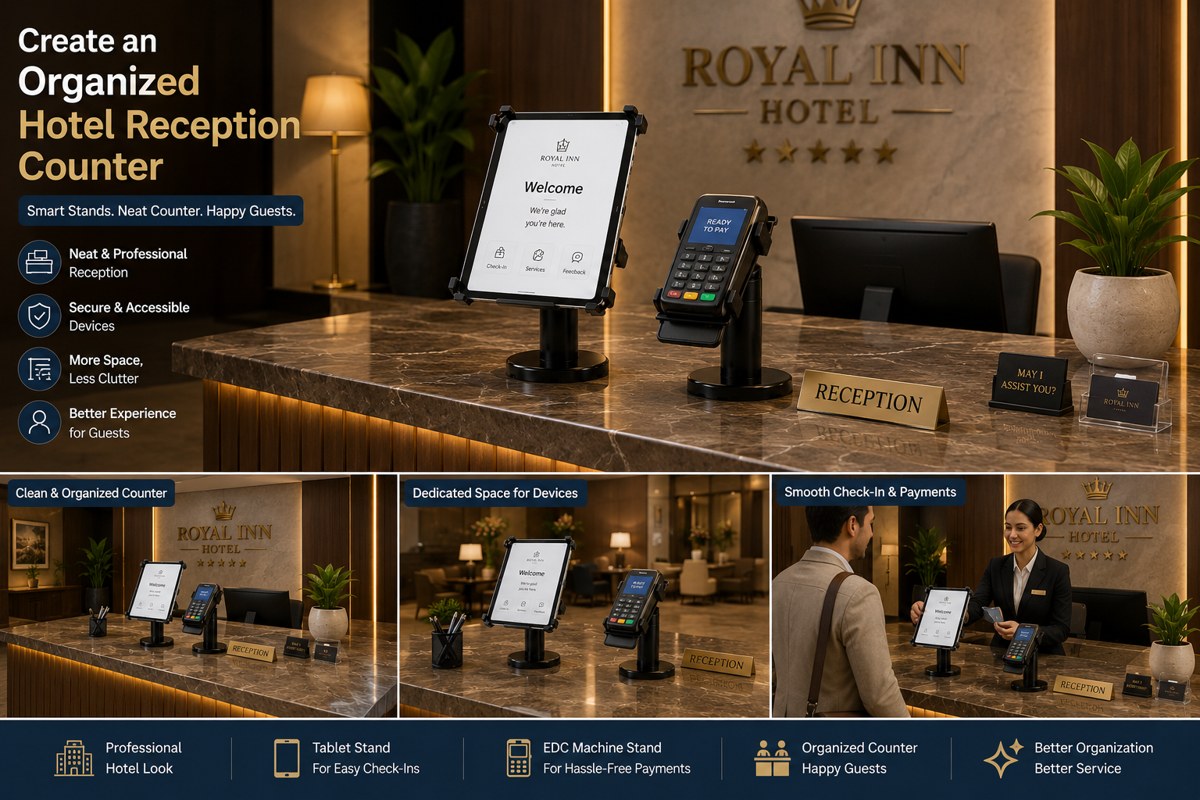
The hotel reception counter is one of the first places guests interact with when they enter a hotel. A clean, organized, and professional reception area creates a strong first impression and helps make the check-in experience smooth and welcoming.
However, modern hotel reception counters often contain multiple devices, including tablets, computers, payment machines, telephones, documents, and stationery. When these items are placed randomly on the counter, the space can quickly become cluttered and difficult for staff to manage.
One simple way to improve the organization of a hotel reception counter is by using dedicated device stands. JBM Mart Tablet Stands and EDC Machine Stands can help hotels keep important devices securely positioned, easily accessible, and neatly arranged.
In this blog, we will explore how to create an organized hotel reception counter using practical workspace organization ideas and the right device stands.
Why Is an Organized Hotel Reception Counter Important?
The reception area represents the hotel’s professionalism and hospitality. Guests often form their first impression of the hotel based on what they see when they arrive.
An organized reception counter can help:
-
Create a professional first impression
-
Improve the guest check-in experience
-
Keep important devices easily accessible
-
Reduce unnecessary clutter
-
Help reception staff work efficiently
-
Create a clean and modern appearance
-
Improve the overall functionality of the workspace
A well-organized counter allows hotel staff to focus on providing excellent service instead of searching for devices or dealing with a cluttered workspace.
1. Create a Dedicated Space for Every Device
One of the main reasons hotel reception counters become messy is that multiple devices are placed randomly across the countertop. A better approach is to create a dedicated position for every important device.
For example:
-
Tablets should have a fixed location
-
Payment machines should remain in an easily accessible area
-
Computers should have their designated workspace
-
Telephones should be positioned conveniently for staff
Using dedicated stands for tablets and EDC machines helps create a more structured reception counter. Instead of placing devices directly on the countertop, stands can help keep them properly positioned and organized.
2. Keep Your Tablet Organized with a Tablet Stand
Tablets are becoming increasingly useful in modern hotel reception areas. They can be used for guest registration, digital check-in, displaying hotel information, collecting feedback, and managing reservations.
However, placing a tablet flat on the reception counter can take up unnecessary space and make it difficult to use. A JBM Mart Tablet Stand can help create a dedicated location for the device while keeping the reception counter neat and professional.
Using a tablet stand can help:
-
Keep the tablet securely positioned
-
Improve accessibility for hotel staff
-
Save valuable counter space
-
Create a cleaner workspace
-
Provide a professional appearance
-
Make digital check-in more convenient
A properly positioned tablet can also improve the overall appearance of a modern hotel reception area.
3. Organize Payment Transactions with an EDC Machine Stand
Payment is an important part of the guest check-in and check-out process. Most hotel reception areas use EDC or card payment machines for quick and convenient transactions.
When an EDC machine is placed loosely on the reception counter, it can occupy valuable space and may be inconvenient for both guests and staff.
A JBM Mart EDC Machine Stand provides a dedicated place for the payment machine. It can help keep the device organized and conveniently positioned during transactions.
Benefits of using an EDC machine stand include:
-
Keeps the payment machine in a fixed location
-
Reduces clutter on the reception counter
-
Makes payment transactions more convenient
-
Creates a more professional checkout experience
-
Helps organize the front desk workspace
A dedicated payment machine stand can be especially useful in busy hotels where multiple guests check in and check out throughout the day.
4. Separate the Check-In and Payment Areas
An organized hotel reception counter should have separate zones for different activities. For example, you can create:
Check-In Zone
The check-in zone can include the tablet or other devices used for guest registration and reservation management. A tablet stand helps keep the device properly positioned and easily accessible.
Payment Zone
The payment zone can include the EDC machine used for card and digital payments. Using an EDC machine stand gives the payment device a dedicated location and helps prevent the counter from becoming cluttered.
Creating separate zones makes it easier for hotel staff to work efficiently and creates a smoother experience for guests.
5. Save Valuable Counter Space
Hotel reception counters often need to accommodate many items. Documents, computers, telephones, payment devices, and stationery can quickly take up available space. Using stands can help make better use of the countertop.
Instead of placing tablets and EDC machines flat on the desk, dedicated stands help organize devices vertically and create a cleaner arrangement.
This is particularly useful for:
-
Small hotel reception areas
-
Boutique hotels
-
Guest houses
-
Business hotels
-
Resorts
-
Busy front desk counters
Making better use of available space can significantly improve the functionality and appearance of the reception area.
6. Improve the Guest Experience
An organized reception counter does more than improve the appearance of the workspace. It can also make the guest experience smoother. When devices are properly positioned:
-
Staff can access them quickly
-
Guests know where to complete payments
-
Digital check-in becomes easier
-
The counter looks clean and professional
-
Transactions can be handled more efficiently
Small improvements in workspace organization can contribute to a better overall hospitality experience. A professional-looking reception area can also increase guest confidence in the hotel's service quality.
7. Keep Cables and Accessories Under Control
Electronic devices often come with charging cables and accessories. Loose cables can make a hotel reception counter look untidy. Keep charging cables organized and avoid allowing unnecessary wires to spread across the counter.
You can create a simple system by:
-
Keeping chargers behind the counter
-
Routing cables neatly
-
Avoiding unnecessary accessories on the countertop
-
Keeping only essential devices visible
When tablets and payment machines have dedicated positions, it becomes easier to organize the surrounding workspace.
8. Maintain a Clean and Minimal Reception Counter
A hotel reception counter should feel welcoming rather than crowded. Avoid filling the countertop with unnecessary paperwork, promotional materials, stationery, or unused equipment. Keep only the items required for daily operations visible.
An ideal reception counter should have:
-
A properly positioned tablet
-
An organized payment machine
-
Essential computer equipment
-
Limited stationery
-
Clean guest-facing space
A minimal and organized design can make the hotel reception area look more modern and professional.
9. Make the Workspace Easy for Staff to Use
Organizations should not only focus on appearance. The reception counter should also be comfortable and convenient for hotel staff. Frequently used devices should be positioned where staff can access them easily.
For example:
-
Place the tablet in the main check-in area
-
Keep the EDC machine conveniently positioned for payments
-
Avoid placing devices too far away
-
Keep the counter free from unnecessary obstacles
A well-planned setup can help staff work faster, especially during busy check-in and check-out hours.
10. Maintain Organization Every Day
Creating an organized hotel reception counter is only the first step. Maintaining it is equally important. Reception staff should regularly:
-
Return devices to their designated positions
-
Remove unnecessary paperwork
-
Organize cables and accessories
-
Clean the countertop
-
Keep the tablet stand clean
-
Keep the EDC machine area ready for guests
-
Check that all essential equipment is functioning properly
A simple daily routine can help maintain a professional and organized reception environment.
Why Choose JBM Mart Tablet and EDC Machine Stands?
Hotels require practical solutions that help create professional and efficient workspaces.
JBM Mart Tablet Stands and EDC Machine Stands can help organize important devices at the hotel reception counter by giving them dedicated positions. These stands are suitable for creating a more organized setup in areas such as:
-
Hotel reception counters
-
Resort front desks
-
Guest house reception areas
-
Restaurant billing counters
-
Spa reception desks
-
Office reception areas
-
Retail billing counters
By using dedicated stands for essential devices, businesses can reduce countertop clutter and create a cleaner, more professional workspace.
Frequently Asked Questions
How can I organize a hotel reception counter?
You can organize a hotel reception counter by creating dedicated zones for check-in, payments, computers, and documents. Using dedicated stands for tablets and EDC machines can also help reduce clutter.
Why should hotels use a tablet stand at the reception desk?
A tablet stand helps keep the device properly positioned, easily accessible, and organized while saving valuable counter space.
What is the benefit of using an EDC machine stand at a hotel reception?
An EDC machine stand provides a dedicated position for the payment device, helping create a cleaner counter and making payment transactions more convenient.
Can tablet and EDC machine stands be used in other businesses?
Yes. These stands can also be useful in restaurants, retail stores, offices, clinics, spas, and other businesses that use tablets or payment machines.
How can an organized reception counter improve the guest experience?
An organized counter helps staff work efficiently, makes check-in and payment processes smoother, and creates a professional and welcoming first impression for guests.
Conclusion
A clean and organized hotel reception counter can create an excellent first impression and improve the experience for both guests and staff.
Simple changes such as creating dedicated zones for check-in and payments, reducing unnecessary clutter, organizing cables, and positioning important devices properly can make a significant difference.
With JBM Mart Tablet Stands, hotels can keep tablets securely positioned and easily accessible for digital check-ins and guest services. Meanwhile, JBM Mart EDC Machine Stands can help create an organized and convenient payment area for smooth transactions.
Together, these practical workspace solutions can help transform a cluttered hotel reception counter into a clean, modern, organized, and professional front desk.
Whether you manage a small boutique hotel, a busy business hotel, or a large hospitality property, the right device organization can improve both workspace efficiency and guest experience.